

Highlights from the March ECMECC Tech Integration Newsletter

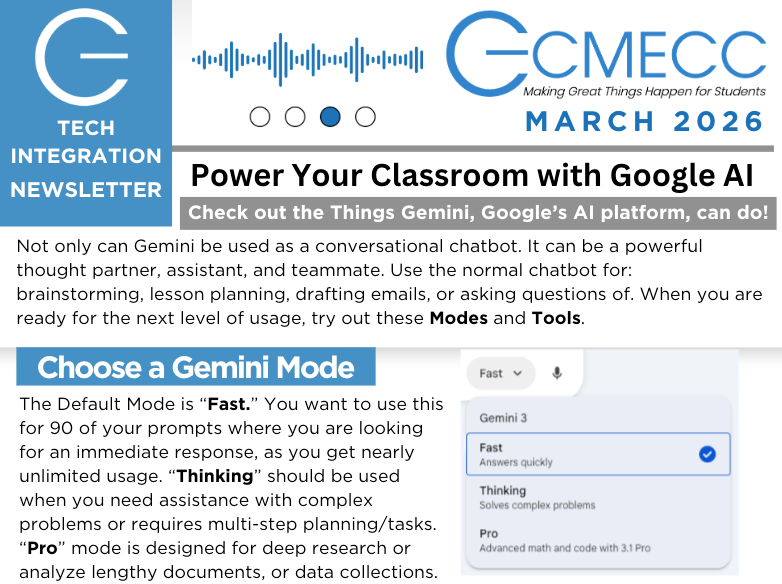
2026 ECMECC Tech Integration Newsletter highlights several tools, resources, and ideas educators can use right now to enhance instruction. From exploring Google’s Gemini AI tools to new ways of visualizing student thinking, here are the key takeaways from this month’s update.he key takeaways from this month’s update.
Getting Started with Google Gemini in the Classroom
Google’s Gemini AI platform can be much more than a simple chatbot. It can serve as a thought partner for brainstorming, lesson planning, drafting communications, or answering questions. But when educators want to go deeper, Gemini includes several powerful modes and tools designed for different tasks. March 2026 Newsletter
Choosing the Right Gemini Mode
Gemini provides three main modes depending on your needs:
Fast Mode – Best for quick prompts and everyday classroom tasks. This is the default and works well for the majority of use cases.
Thinking Mode – Designed for complex problems or tasks that require multi-step planning.
Pro Mode – Ideal for deep research or analyzing large documents and datasets. March 2026 Newsletter
Helpful Gemini Tools for Educators
Gemini also includes tools that support teaching and learning workflows:
Guided Learning – A Socratic-style tutoring tool that leads students toward answers rather than giving them directly.
Deep Research – Helps gather and cite sources, saving teachers hours of research time.
Canvas – A collaborative workspace where you can build documents, presentations, or other projects alongside AI. March 2026 Newsletter
Together, these tools allow educators to move beyond simple prompts and start using AI as a true instructional partner.
Creating Graphic Novels with AI
Graphic novels have long been a powerful way to engage students because they combine visuals and text, supporting dual coding, inference skills, and accessibility for learners.
With tools like Gemini and NotebookLM, educators and students can now create their own basic graphic novels using AI. Eric Curts (CtrlAltAchieve) has shared examples, templates, and directions to help teachers explore this creative approach in their classrooms. March 2026 Newsletter
This can be an exciting way for students to demonstrate understanding of concepts, retell historical events, or craft narratives across content areas.
Minnesota Resources for Getting Started with AI
SchoolAI has launched a resource hub specifically for Minnesota educators. The site includes:
“Getting Started with AI” guides
Admin prompt libraries
District policy examples
AI literacy resources for students and teachers
The platform also offers Instructional Toolkits tailored by grade level and specialty areas such as STEM, CTE, Special Education, MTSS, and administration. March 2026 Newsletter
These curated resources provide practical starting points for educators looking to explore AI in their classrooms or districts.
AI in Education: What Teens Are Saying
A recent Pew Research Center survey sheds light on how students are already using AI tools:
Over half of U.S. teens report using chatbots to help with schoolwork.
51% say AI tools are somewhat to extremely helpful for school tasks.
10% say they use AI for all or most schoolwork, while 45% report not using it at all.
59% believe AI cheating is common among students at their school. March 2026 Newsletter
The data highlights the importance of helping students develop strong AI literacy and ethical use habits as these tools become more common in learning environments.
Making Student Thinking Visible
One emerging classroom tool worth exploring is the Whiteboard feature in Brisk Boost.
This tool turns any resource into an interactive drawing board where students can:
Sketch math models
Label science diagrams
Map story arcs or processes
Teachers can monitor student thinking in real time, while students receive AI-supported feedback during the learning process. March 2026 Newsletter
Creative Map Making with Google My Maps
For educators who love geography or data visualization, Google My Maps offers an engaging way to turn spreadsheets of locations into interactive maps.
A tutorial from Brian Buffington demonstrates how educators can guide students in creating their own maps—an activity that works well for social studies, history, and project-based learning. March 2026 Newsletter
Upcoming Learning Opportunities
A.I.D.E Virtual Symposium
Educators interested in the future of AI in education may want to attend the 2026 A.I.D.E Virtual Symposium, hosted by the Southwest West Central Service Cooperative’s Center for Artificial Intelligence Development in Education.
Event Details:
Date: May 1, 2026
Time: 9:00 AM – 3:30 PM
Keynote: Becky Keene (AI Optimism)
Cost: $99, with recordings available for attendees. March 2026 Newsletter
The event will explore practical strategies and real-world applications of AI in schools.
Integrate This! Podcast and Tech Tidbits
ECMECC continues to provide learning opportunities through two ongoing initiatives:
Integrate This! Conversations
Weekly podcast discussions with leaders and integrationists in edtech.
New episodes drop every Thursday on Spotify and Apple Podcasts.
Tech Tidbits
A monthly 25-minute virtual session demonstrating a practical tech integration strategy.
February’s session explored AI + SAMR for transformative learning, and March will focus on Eduaide AI 3.0 and how it supports teachers without disrupting effective instructional practices. March 2026 Newsletter
AI Literacy: Teaching Ethical Use
This month’s AI literacy focus highlights the “E” for Ethical in AI for Education’s SEE Framework (Safely, Ethically, Effectively).
Educators are encouraged to:
Maintain academic integrity when using AI
Design activities that promote critical thinking with AI
Discuss ethical scenarios with students
Be transparent about issues like bias and environmental impact
Adopt a “do no harm” mindset that keeps learning human-centered. March 2026 Newsletter
Helping students use AI responsibly ensures the technology supports learning rather than replacing it.
Final Thoughts
AI tools are quickly becoming part of everyday classroom life. By exploring platforms like Gemini, encouraging creative student work with tools like NotebookLM, and focusing on ethical AI use, educators can ensure these technologies enhance—not replace—meaningful learning.
If you have questions or would like support integrating these tools, reach out to Jeremy Mikla at ECMECC or explore additional resources through the Tech Integration newsletter.


Comments